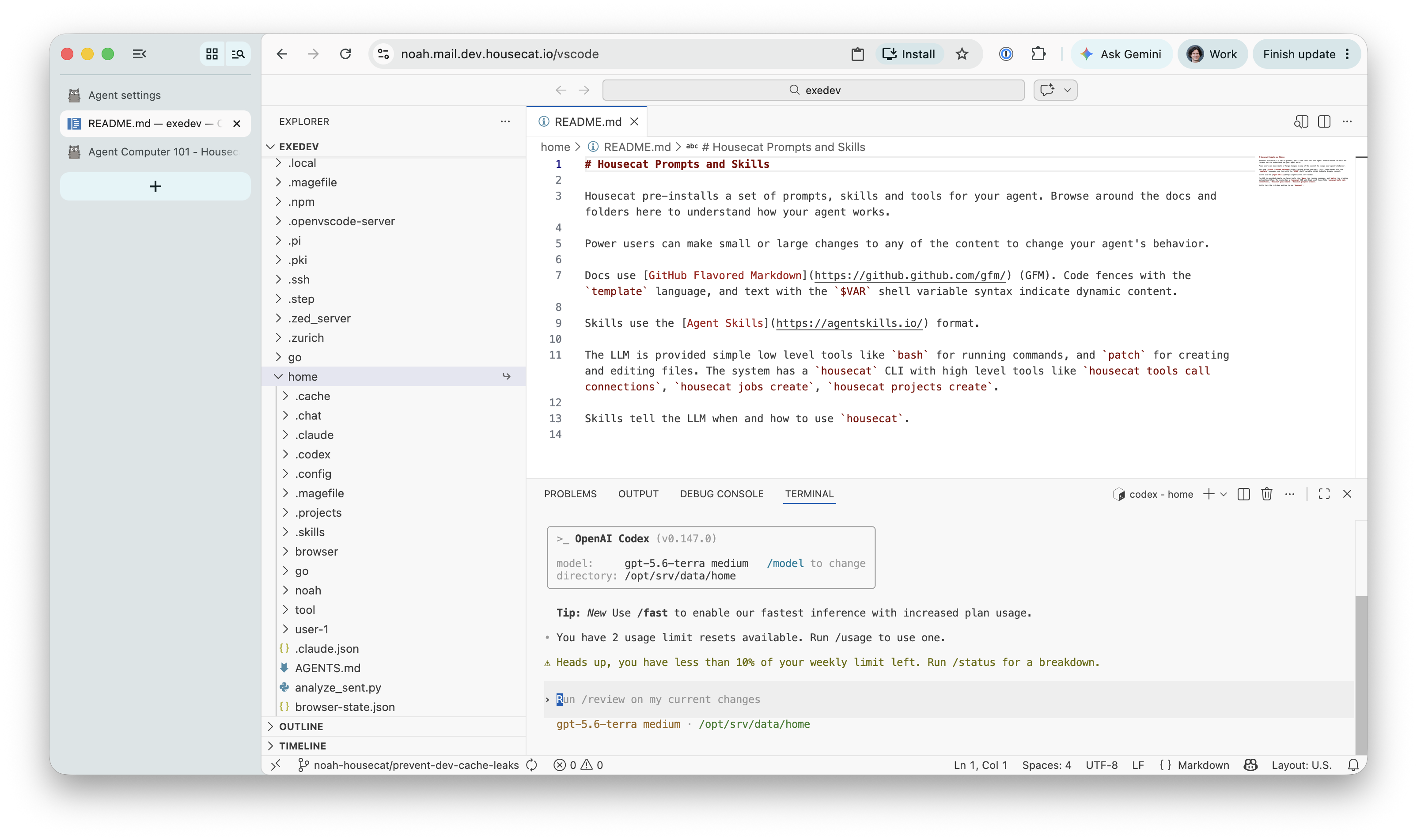
Agent Computer with OpenVSCode
In addition to our personal phone and laptop, our personal agent computer is running 24/7 with a coding harness ready to do our bidding.
Most of the time we message it with one off requests we trust it will one-shot:
Review new support emails that need triage, review the codebase and draft a pull request with a fix if possible, and draft an email reply to the user
But sometimes we need to build full blown software, workflows, and apps that require us to drive a full on agentic coding session:
Plan and build product analytics dashboard.
Build a workflow that fetches web server logs, product usage metrics, and chat transcripts, removes PII, then stores in a local analytics database
Build an event viewer, and summary dashboard with user and date range filters.
For these scenarios a full blown Integrated Development Environment (IDE) is the ultimate power tool.
For this reason Housecat offers an integrated browser-based Visual Studio Code that lets you build full-blown software on your agent computer anywhere you can open a web browser.
Try it Out
Sign up for Housecat, then browse to https://mail.housecat.com/vscode, and click “Enable IDE” to activate it.
You can explore your local SQLite database and data, the Housecat codebase, docs and skills, connect claude or codex Terminal UIs to your subscription, and put your Agent Computer to work on your email or other work.
This tool is optional, as we offer the same abilities through a user-friendly web app and chat agent. But for developers, tinkerers or hackers, access to your full agent computer through an IDE is familiar, powerful and productive.
Housecat IDE with file browser, editor and codex coding harness
Cloud IDEs
Cloud IDEs are nothing new.
In 2008 Heroku launched a revolutionary web-based environment for building Ruby on Rails apps (which it quickly pivoted away from in favor of a universal git push heroku CLI). In 2010 Cloud9 launched their full blown web IDE. Today GitHub Codespaces, GitPod, Replit and many more offer cloud based IDEs and development containers.
Over the decades IDEs, web technologies, browsers, and cloud sandboxes have all evolved to where building, running, and deploying all in the browser and cloud has many advantages.
Recently agentic coding and agent computers has greatly increased the value proposition of having dev / build / deploy tools running 24/7 in a cloud, independent of your laptop which has access to too much data and goes to sleep when you close it.
Open VSCode Server
In 2015 Microsoft launched Visual Studio Code, a free, open-source1 and extensible derivative of their proprietary Visual Studio IDE that dates all the way back to 1997.
VSCode is a desktop IDE but it is built with web technology via the Electron framework. Starting in 2019 the VSCode team began to refactor its architecture to support a browser-based mode.
Today the VSCode frontend editor and terminal emulator run in both the desktop app Electron renderer and a standalone web browser. The frontend talks over RPC to a backend that can run as either local desktop or remote server system host for filesystem, terminal and extension execution.
GitPod has graciously shared their changes and packaging for a Linux server and browser client through the “openvscode-server” project.
UX and DX for Agent Computers
At Housecat we are continually experimenting to find the right user and developer experience (UX / DX) for agent computers.
There’s now a broad spectrum of how people use their agent computers:
- Fully autonomous – find and do work without any prompting
- Messaging – send a text or email for a task and get an eventual reply back
- Chat – chat with an agent to work together
- Vibe Code – build with a coding agent but don’t read the code
- Agentic Code – plan, build, and review the coding agent’s work
VSCode and its editor, git browser and terminal offers the most powerful and familiar experience to every developer for full on agentic coding. While not everyone wants this, it’s an important tool in the box to build complex software, and a tool we consistently use at Housecat to build the other user experiences.
-
Visual Studio Code is proprietary, but based on the MIT licensed Visual Studio Code - Open Source core. ↩︎