Agent Computer 101
Everyone has a personal phone and laptop. Many of us are now experimenting with one more computer on us all the time: an agent computer.
The minimal definition of an agent computer is a computer running 24/7 on the Internet with an agentic coding harness installed.
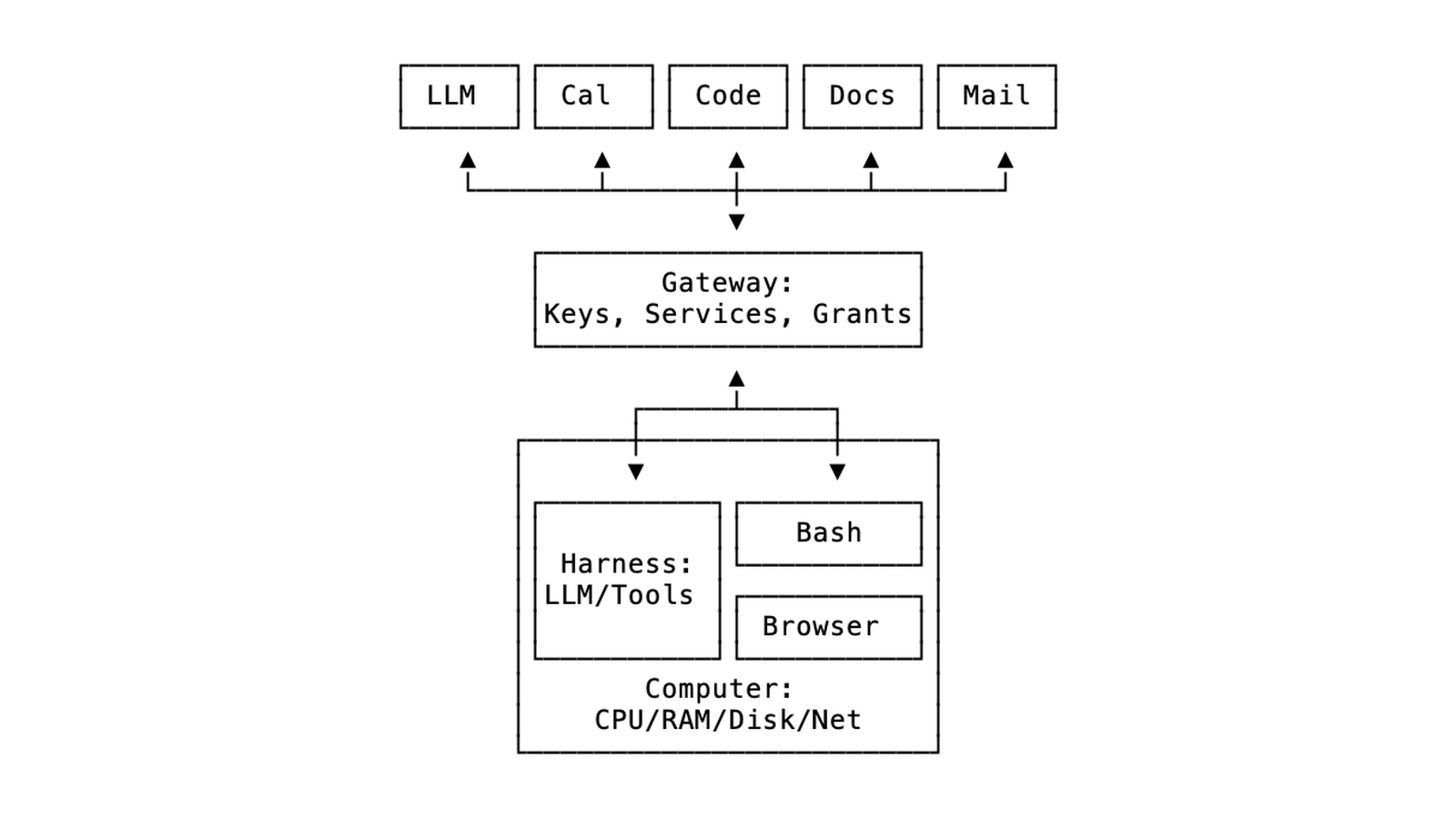
A fully built out agent computer has access to other data and services like docs, email and calendar, and various ways to communicate with it like an email address, chat bridge, or a mobile app.
Why an Agent Computer?
An agent computer is like having an executive assistant or intern on-call 24/7. Send them messages and await the response:
- Review top CRM deals “In Progress”, and make a week plan with next steps to close
- Research breakfast catering options in SF Financial District with gluten free options
- Review new emails with resumes and update the report of Bay Area candidates
Claude Desktop and Cowork can also help with requests like this, but they are generally tied to your laptop, don’t have permanent storage for data and artifacts, and present security challenges like having too much access to files on your laptop, or too restrictive of a sandbox and missing tools. Claude is also a “black box” in its chat and coding harnesses, sandbox, and storage layers that greatly limit you and your agent’s capabilities.
Setting up a dedicated agent computer architecture gives you full control over how things work, and gives your agent a consistent, persistent and secure environment to work in.
Agent Computer Architecture
A basic agent computer is simple: take a dedicated server, install codex, claude, or pi coding agent, connect it to an LLM provider and optional services like GitHub and Google Workspace, and you’re off.
What is wild is that after minimal setup you can work with your agent to install, build and customize everything else on the computer like a web interface, chat bridge, and self-hosted code, calendar, mail and docs apps.
Agent Computer Security
There’s one big catch: security.
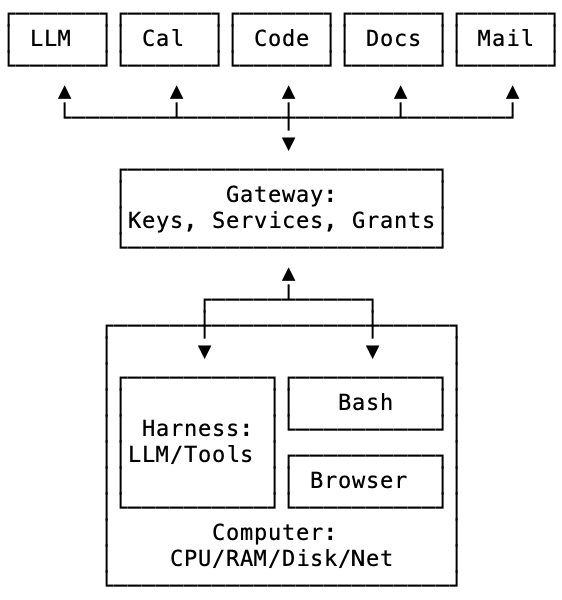
By default coding agents will ask the user for permission to read/write files, install software, and run programs. The dedicated sandbox VM makes it safe to disable this and run in auto mode. Even if they can access everything on the VM, it’s totally isolated from your personal or work laptop.
They will also ask for permission to access data and services over the network. If you grant auto mode here, it’s more scary. If it is connected to your Gmail, it could delete all your email or send thousands of spam messages on your behalf.
The harnesses have ways to configure granular approvals like to allow reading mail but to ask for approval to send mail. But if there are API keys on the computer that allow sending, it’s possible for the agent to code its own ability to use them directly, bypassing approval.
Therefore we strongly recommend a separate gateway outside the agent computer that stores raw access tokens securely and governs all network requests and can block requests to send email.
This is the equivalent of installing a “Little Snitch” to monitor and firewall your agent computer.
Getting Your First Agent Computer
An agent computer comes in many shapes and sizes.
- DIY: buy a Mac Mini, run it on your home internet 24/7, and install OpenClaw
- Platform: sign up for exe.dev, create a VM, set up integrations, and chat with Shelley their open source coding agent
- Startup: sign up for housecat.com, connect Google Workspace, and use the email inbox with integrated agent
- Hyperscaler: sign up for Grok Bot
It is still early for this type of computer. At Housecat we plan to research, design and experiment with what makes the best experience for people new to running a dedicated computer for their agents.